Voice to text typing in windows 11 | Laptop Main Voice Se Text kaise likhate Hain ?

Hello Friends / guys aaj hum aapko batane ja rahe hai Ki voice is through text kaise typing karte Hain windows 11 Mein.

Laptop Mein voice K through kaise text typing Ki jaati hai , main aapko aaj batane JA raha Hun so aapne abhi Tak hamara website kor like| share | subscribe nahi kiya hai toh please like share subscribe sub kar dijiye is tarah Ki helpful tricks / video ke liye hamare website ko like Kare. so chaliye jaante Hain :-

Guys / Friends Agar aap windows 10 or windows 11 use karte Hain to aap apane laptop par voice k through text typing kar sakte Hain iske liye aapko jyada kuchh karne Ki jarurat nahi hai, ya koi bhi 3rd party software download karne Ki jarurat nahin hai. windows 11 Mein yeh inbuilt option hota hai so aapko bas windows plus H ( WIN+H ) button dabana hai. Jisase Ki aapko voice recording ka Jo feature hai woh enable ho jayega.

voice recording or voice typing in windows 11

Iske baad aapko voice recording ke setting button par Jana hai or voice launcher button ko enable karna hai. Jaise hi AAP waise launcher ko enable karenge AAP easily voice ke through text type kar sakte Hain ismen aapko keyboard Ki bhi jarurat nahin hai .

So is tarah se AAP bina type kiye sirf voice K through apna text kisi ko bhej sakte Hain jaise AAP bolte jayenge vaise vaise notepad per ya WordPad ya word excel kisi bhi typing application par use kar sakte hai . yeh usi tarah kaam karega jaise AAP mobile phone par voice button ko dabakar voice record kar bhejte hai usi tarah yeh kaam karega.

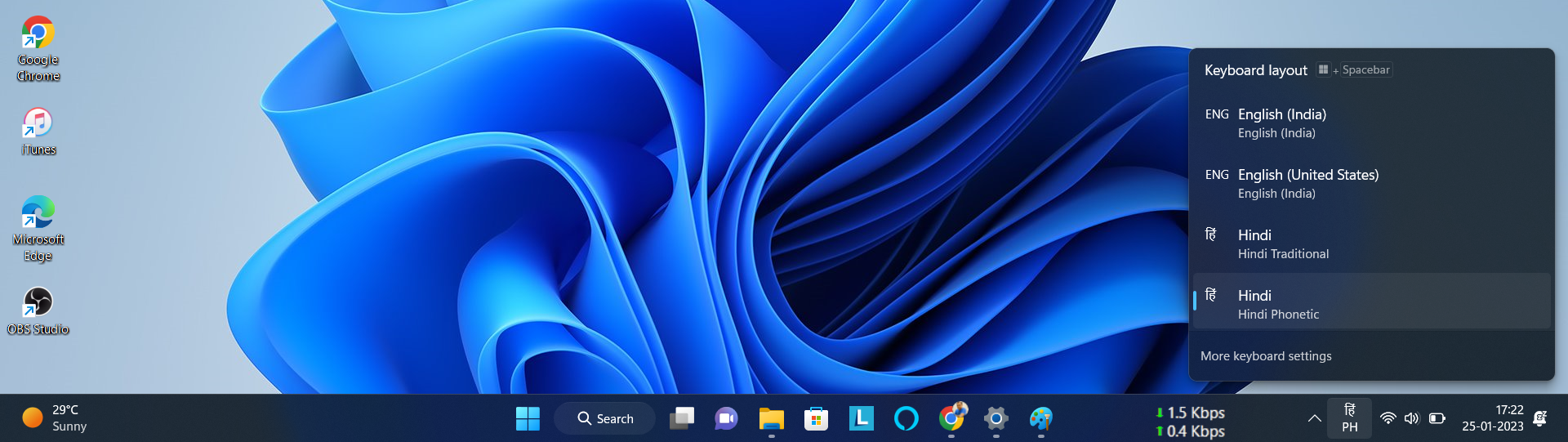
यहाँ पर कुछ लोगों का सवाल यह होगा कि यह तो इंग्लिश में टाइप हो रहा है हिंदी वार्ड में कैसे टाइप होगा ? तो इसके लिए आपको राइट साइड में कीबोर्ड वाले बटन पर जाना पड़ेगा | वहाँ जाकर कीबोर्ड सेटिंग मैं कीबोर्ड के ऑप्शन में ऐड लैंग्वेज पर जाकर हिंदी सलेक्ट कर लीजिए और उसे डाउनलोड कर लीजिए |
Enable Hindi keyboard in windows 11

डाउनलोड होने के बाद अब को कीबोर्ड में जाकर उसे हिंदी कीबोर्ड पर सलेक्ट करना होगा इसके बाद आपको विंडोज प्लस एच (win+h ) बटन दबाना पड़ेगा इसके बाद आप हिंदी में टाइप कर सकते हैं वॉइस के थ्रू वॉइस के जरिये हिंदी में टाइप कर सकते हैं|

voice typing video

यह ट्रिक आपको कैसी लगी कमेंट करके जरूर बताएं और अपने दोस्तों में शेयर भी करें|

Best Memory Card Recovery Software For PC

[ad_1]

आज हम आपको एक ऐसा सॉफ्टवेर के बारे में बताने जा रहे है, जिससे आप सभी टाइप्स के डाटा Corrupt या डिलीट हो चुके फोटो, वीडियो और अन्य डाटा रिकवर कर सकते है, इस सॉफ्टवेयर का नाम है: Card Recovery Professional . यह सर्वश्रेष्ठ Memory Card Recovery Professional सॉफ्टवेर है , यह 60 दिन की मनी-बैक गारंटी के साथ आता है.

कभी-कभी हम अनजाने में अपनी कोई फोटो या कोई भी डाटा गलती से Memory Card से डिलीट हो जाती है , या कभी बच्चे डिलीट कर देते हैं , तो इस समस्या का समाधान के लिए यह सॉफ्टवेयर बहुत अच्छा है, जिससे आप कभी भी अपने मेमोरी कार्ड को रिकवर कर सकते हैं , उसमें डिलीट हुए जितने भी फोटो या डाटा को रिकवर कर सकते हैं , इसके लिए यह अच्छा सॉफ्टवेयर है.

अगर आपका कोई भी SD कार्ड करप्ट हो चुका है , और उसमें के फोटोस और डाटा वापस नहीं आ रहे हैं, तो आप इस सॉफ्टवेयर का यूज कर सकते हैं , इससे आपका जो भी डाटा है वह वापस आ जाएगा.

यदि आपका करप्ट हुआ डाटा बहुत इंपॉर्टेंट है , तो आपको यह सॉफ्टवेयर यूज कर लेना चाहिए . और अगर आपका इतना इंपोर्टेंट नहीं है , वह फोटोस और डाटा तो , आपकी मर्जी है.

आप पहले के 60 दिन उपयोग करिए , अगर आपको इस सॉफ्टवेयर अच्छा नहीं लगा तो, आपको इसका पूरा खरीद का पैसा वापस हो जायेगा. आप product के अंदर दिए गए पते पर एक ईमेल भेजकर धनवापसी का request कर सकते हैं, और company आपकी संपूर्ण खरीद मूल्य वापस कर देगी . बिना कोई सवाल पूछे.

Click here to get Card Recovery Professional at discounted price while it’s still available…

All orders are protected by SSL encryption – the highest industry standard for online security from trusted vendors.

Read More Best Memory Card Recovery Software For PC

Best Video & Audio Converter Software With 60 Day’s Money-back Guarantee

[ad_1]

आज हम आपको एक ऐसा सॉफ्टवेर के बारे में बताने जा रहे है, जिससे आप सभी टाइप्स के वीडियो और ऑडियो को कन्वर्ट कर सकते है. सॉफ्टवेयर का नाम है: Vip Video Converter – Best Video & Audio Converter For PC. वीआईपी वीडियो कनवर्टर – सर्वश्रेष्ठ वीडियो और ऑडियो कनवर्टर है , यह 60 दिन की मनी-बैक गारंटी के साथ आता है .


आप पहले के 60 दिन उपयोग करिए , अगर आपको इस सॉफ्टवेयर अच्छा नहीं लगा तो, आपको इसका पूरा खरीद का पैसा वापस हो जायेगा. आप product के अंदर दिए गए पते पर एक ईमेल भेजकर धनवापसी का request कर सकते हैं, और company आपकी संपूर्ण खरीद मूल्य वापस कर देगी . बिना कोई सवाल पूछे (you can request a refund by sending an email to the address given inside the product and we will immediately refund your entire purchase price, with no questions asked.)

Click here to get Vip Video Converter – Best Video & Audio Converter at discounted price while it’s still available…

सभी आदेश SSL एन्क्रिप्शन द्वारा सुरक्षित हैं – विश्वसनीय विक्रेताओं से ऑनलाइन सुरक्षा के लिए उच्चतम उद्योग मानक।(All orders are protected by SSL encryption – the highest industry standard for online security from trusted vendors.)

Read More Best Video & Audio Converter Software With 60 Day’s Money-back Guarantee

[ad_1]

आज हम आपको एक ऐसा सॉफ्टवेर के बारे में बताने जा रहे है, जिससे आप सभी टाइप्स के वीडियो और ऑडियो को कन्वर्ट कर सकते है. सॉफ्टवेयर का नाम है: Vip Video Converter – Best Video & Audio Converter For PC. वीआईपी वीडियो कनवर्टर – सर्वश्रेष्ठ वीडियो और ऑडियो कनवर्टर है , यह 60 दिन की मनी-बैक गारंटी के साथ आता है .


आप पहले के 60 दिन उपयोग करिए , अगर आपको इस सॉफ्टवेयर अच्छा नहीं लगा तो, आपको इसका पूरा खरीद का पैसा वापस हो जायेगा. आप product के अंदर दिए गए पते पर एक ईमेल भेजकर धनवापसी का request कर सकते हैं, और company आपकी संपूर्ण खरीद मूल्य वापस कर देगी . बिना कोई सवाल पूछे (you can request a refund by sending an email to the address given inside the product and we will immediately refund your entire purchase price, with no questions asked.)

Click here to get Vip Video Converter – Best Video & Audio Converter at discounted price while it’s still available…

सभी आदेश SSL एन्क्रिप्शन द्वारा सुरक्षित हैं – विश्वसनीय विक्रेताओं से ऑनलाइन सुरक्षा के लिए उच्चतम उद्योग मानक।(All orders are protected by SSL encryption – the highest industry standard for online security from trusted vendors.)

Read More Best Video & Audio Converter Software With 60 Day’s Money-back Guarantee

Best Video Animation Software 2020-21

[ad_1]

 आज हम आपको बताने जा रहे है एक ऐसे सॉफ्टवेयर के बारे में जो की अनिमैटिक वीडियो बनाने के लिए बेस्ट है , आइये जानते है-

एनीमेशन वीडियो बनाने के लिए आपको आवश्यकता है-(For animation video making you need):-

एनीमेशन करने के लिए आपको पूरी प्रक्रिया को समझने की आवश्यकता है। यहाँ क्या आवश्यक है, इसका सारांश है: स्क्रिप्ट, स्टोरीबोर्ड, ऑडियो Dialogue रिकॉर्डिंग, Music, Sound Effects, Sound Editing , एनिमेटेड, Character डिजाइन, एनीमेशन, दृश्य रचनाएं(Scene Compositions) और अंत में, संपादन(Editing)।  और अगर आप इसे हासिल करना चाहते हैं, तो आपको सॉफ्टवेयर की जरूरत है। यदि आप YouTube पर अपने message को अधिक कुशलता (efficiently) से communicate करना चाहते हैं, तो मेरा सुझाव है, कि आप एक video-editing सॉफ़्टवेयर खरीदें।

For Animatic Video Making :-

एनीमेशन video बनाने के लिए आपको वीडियो एडिटिंग सॉफ्टवेयर Video Editing Software का उपयोग कर सकते है. इस सॉफ्टवेयर के लिए बेशक कुछ पैसे इन्वेस्ट करना होगा अप्प्रोक्स approx $37 USD, Indian Rupees में लगभग 2700/- से 2800/- तक जो कि साधारण है.  वो कहाकावत तो आपने सुनी होगी “कुछ पाने के लिए कुछ खोना पड़ता है” बस वही समझ कर आप इन्वेस्ट कर सकते है .


आइये इस सॉफ्टवेयर के फीचर के बारे में जानते है-

  1.  Microsoft and Google Dynamic Text To Speech Options Included To Give Your Videos A Realistic Sounding Voice .
  2. Ready-To-Go Animated Characters Included For Just About Any Scenario and Niche That You Want To Dominate
  3. Massive Royalty Free Library With HD Background Images and Music Files Ready With A Click.
  4. There Are NO MONTHLY FEES. One Download And You’re Good To Go.
  5. Making Videos Is Easy As 1, 2, 3 and Ready your Video!
  6. 25 Characters Included in this software
  7. 30 Eye Catching Animations That Grabs Attention Immediately!
  8. 34 HD Backgrounds To Make Your Videos Popular !

How to Make a animated Video for YouTube?

Cloud Based Animation Video Making Software:- 

यह एक ऐसा सॉफ्टवेयर है, जिससे आप ऑनलाइन वीडियो बना सकते है . यह फुल-ऑटो वीडियो एनीमेशन सॉफ्टवेयर है . एक बार जब आप अपना एनीमेशन तैयार कर लेते हैं, तो आप अपने क्लाउड based वीडियो एडिटिंग सॉफ़्टवेयर का उपयोग करके सभी Clips को एक साथ रख सकते हैं, क्लिक करें और sequence में क्लिप का select  कर सकते हैं, उसके बाद आपके पास अपना final वीडियो होगा।  आप एक अच्छा वीडियो बनाकर यूट्यूब या किसी भी इतर प्लेटफार्म में अपलोड करना चाहते है तो यह सॉफ्टवेयर आपके लिए अच्छा साबित होगा. यदि आप एक बार इस सॉफ्टवेयर का यूज़ कर लेंगे, तोह आप कभी भी दूसरे सॉफ्टवेयर पर स्विच नहीं करेंगे.  इस सॉफ्टवेयर के लिए बेशक कुछ पैसे इन्वेस्ट करना होगा approx $77 USD, Indian Rupees में लगभग 5750/- से 5900/- तक जो कि साधारण है. यह एक ONE TIME इन्वेस्टमेंट है . For More Details 

यह इनफार्मेशन आपको कैसी लगी ? LIKE एंड SHARE करना न भूले.

[ad_2]

Advantages of Video Editing Software- Best Video Editing Software for YouTubers

[ad_1]

आप youtuber हो और आपको अच्छी एनिमेटेड वीडियो Youtube पर अपने चैनल पर डालनी है ? 

आप youtuber हो और आपको अच्छी एनिमेटेड वीडियो Youtube पर अपने चैनल पर डालनी है ?  तो आज हम बताने जा रहे है आपको सबसे अच्छा वीडियो एडिटिंग सॉफ्टवेयर के बारे में एंड वीडियो एडिटिंग के फायदे… (So today we are going to tell you about the best video editing software and the advantages of video editing…)


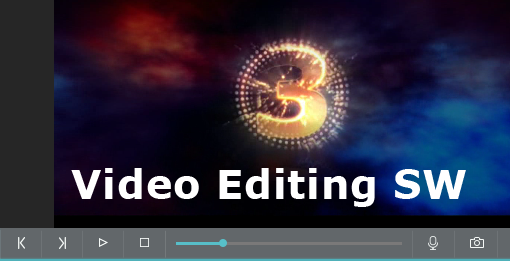
video output Preview – look like

The Software we are going to tell you about is 100% Cloud based. No software to install. Easy access whenever you need it. Several advantages are there by using video editing software, but the most important thing you have to take care is that you have to choose the best one. The software should help to convert the incoming video in to digital form so that the computer can understand. This will help you to edit the video with a great flexibility and speed than that of the conventional video or film editing. In traditional film editing, you have to cut and past the film bit together or you have to copy a selected video from one tape and paste on another tape in a straightforward process. But using software for editing, you can move the video clips from one place to another by dragging the icons diagonally through the screen.One of the best video editing software is here which will help you to export and import the video files directly in to your computer. If you want to create videos that will leave your audience awestruck, and compel them to act, then there is no better time to start than right now. This Software Give your videos a professional shine and gain that next level of respect. Our personal recommendation is that you should use it now. 

This Software Offer’s you 60 Days 100% Money Back Guarantee

[button color=”red” link=”https://t.ly/6zB3″ align=”center” target=”_blank”]Video Editing/Animation Software! Click Here[/button]

Stunning Social Actions and Studio-Quality Animations

If you’re not being social, you’re being left behind. This Software can social media animations bring in the likes, follows, shares and retweets that say ‘this guy is worth talking about. These are high-touch, professional, studio-quality animations that used to only be possible with AfterEffects.

Video output preview – look like

The major advantage of this kind of software is that they do not need any kind of plug-in or downloads to use. By using the software, you can do the video recording with mobile phones and small cameras also. if you want to use this software then there is no previous marketing or design experience needed, Adding some transitions and extra effects is also possible with good software of video editing. You can also save a lot of money by using software as editing videos using traditional methods require more time and has to be done with a professional. You can enhance the quality of the videos by using this software. Your videos can instantly stand out from the pack with just a couple of clicks… and you’ll never need to open up any other animation software again.

With the help of the software, you can create and edit video in the comfort of your home. Video editing includes a lot of techniques to learn but with the help of the software you can edit the video easily and quickly. You can customize your videos according to your tastes using the software. You can choose the designs and layout for the video with the help of software. Get high-class, professional animations in just 3 clicks. You can also put all your photos together that are stored in the computer and make a slideshow with the help of the software. You can enjoy the video by setting background music also.

If you have imagination, then you can make great videos. To make a good rated video, you need to choose a good software which can help you to edit, apply video effects, provide animated text and save files in almost famous video format. It is easy to find this kind of software. There are 170+ Professional Templates.

[ad_2]